


Why is my MT4 always lagging?
If your MT4 terminal has accumulated a large amount of data, you may experience delays or lag in data loading.
To resolve this issue, try the following:
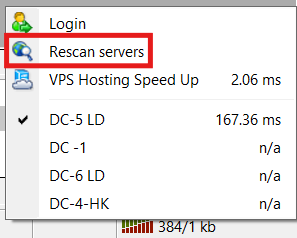
Click the connection status indicator at the bottom-right corner of MT4 and select “Rescan servers” to refresh your available server list.
- Switch to a different network connection.
How to hide symbols in MT4?
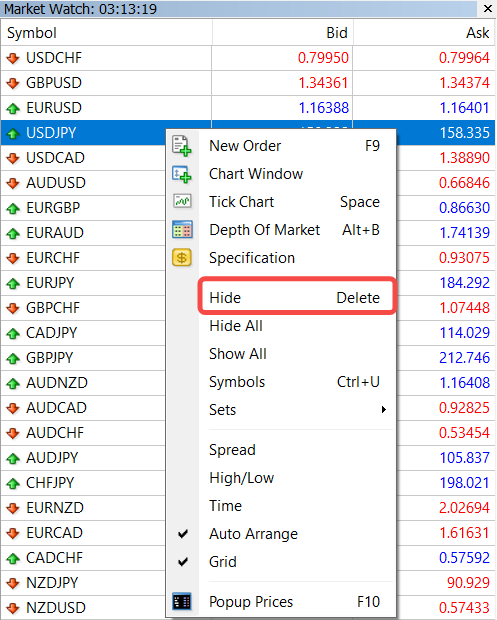
In MT4, go to Market Watch, right-click the symbol you wish to hide, and choose “Hide” from the menu.
How to check specifications in MT4?
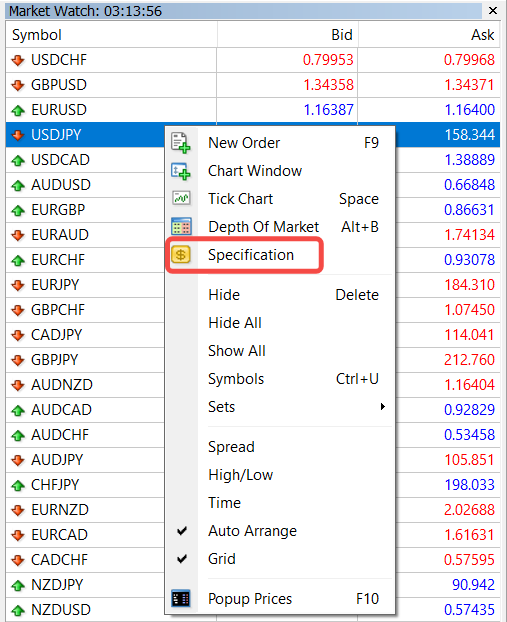
In MT4, open Market Watch, right-click the desired product, and select “Specification” from the menu.
How to reduce or partially close a position in MT4/MT5?
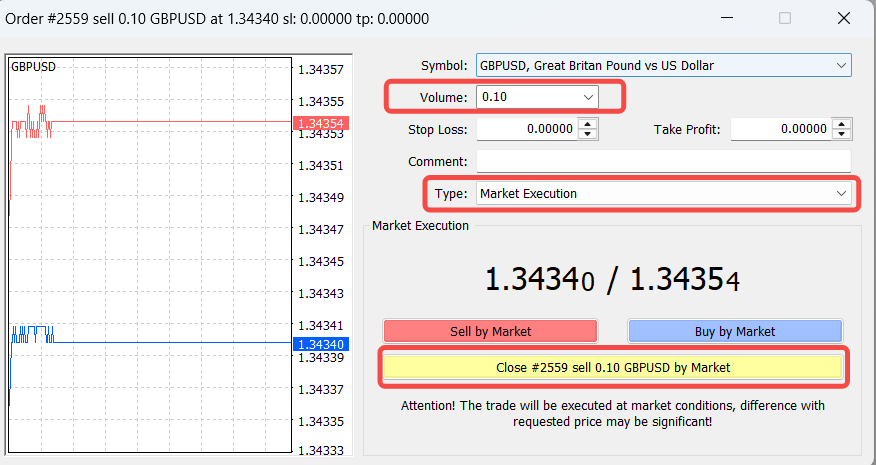
To reduce/ partially close a position, follow these steps:
- Right-click the position you want to reduce.
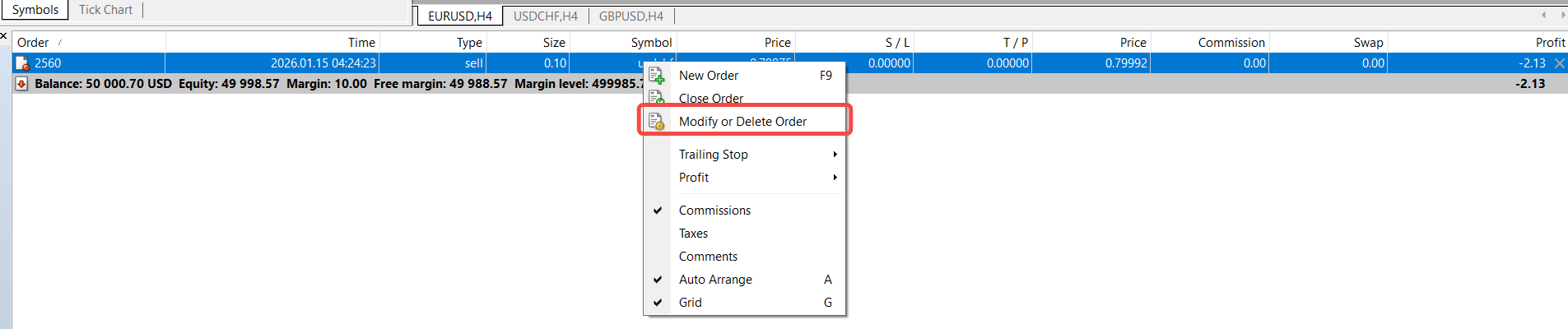
- Select “Modify or Delete Order”.
- In the pop-up window, change the order type to “Market Execution”.
- Enter the number of lots you wish to close.
- Click “Close” to complete the partial closure.
Why does my MT4/5 show “Trade context is busy”?
This message typically appears when the MT4/5 platform is already processing another trade or action at the same time. It indicates that the system is temporarily occupied. Please wait for a moment and try the action again.
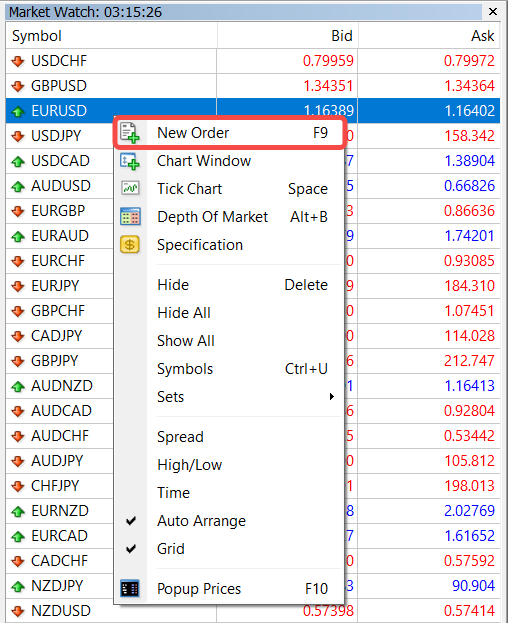
How to open a position in MT4/MT5?
- Right-click the desired instrument in Market Watch and select “New Order”.
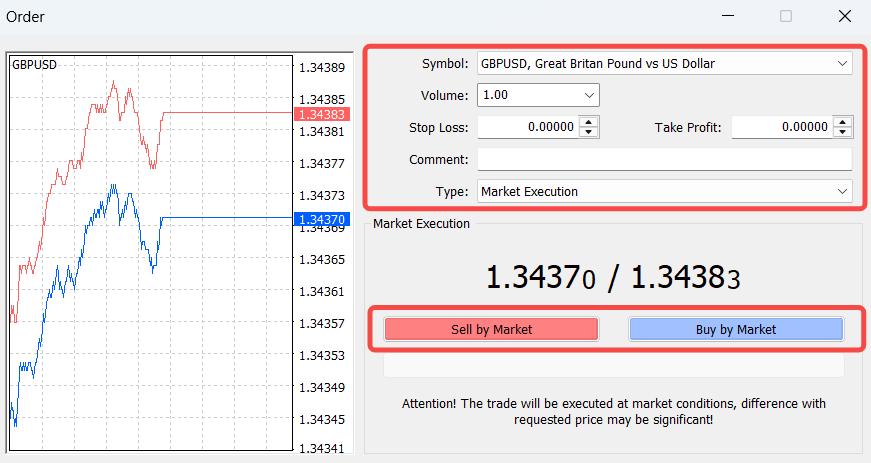
- Choose your lot size and confirm the order type as Market Execution.
- Click “Sell by Market” or “Buy by Market” to place the trade.
How to close a position in MT4/MT5?
- Go to the Trade tab and select the order you want to close.
- Right-click the position and choose “Close Order” in MT4 or “Close Position” in MT5.
- A confirmation window will appear, where you can click “Close” to execute the order.
Note: If you have enabled One-Click Trading in the platform settings, the confirmation window will not appear and the position will close immediately.
Can I access the same trading account on multiple devices at the same time?
Yes, you can log in to your MT4/MT5 trading account on multiple devices at the same time using the same account number.
Why is my MT4 always lagging?
If your MT4 terminal has accumulated a large amount of data, you may experience delays or lag in data loading.
To resolve this issue, try the following:
Click the connection status indicator at the bottom-right corner of MT4 and select “Rescan servers” to refresh your available server list.
- Switch to a different network connection.
How to hide symbols in MT4?
In MT4, go to Market Watch, right-click the symbol you wish to hide, and choose “Hide” from the menu.
How to check specifications in MT4?
In MT4, open Market Watch, right-click the desired product, and select “Specification” from the menu.
How to reduce or partially close a position in MT4/MT5?
To reduce/ partially close a position, follow these steps:
- Right-click the position you want to reduce.
- Select “Modify or Delete Order”.
- In the pop-up window, change the order type to “Market Execution”.
- Enter the number of lots you wish to close.
- Click “Close” to complete the partial closure.
Why does my MT4/5 show “Trade context is busy”?
This message typically appears when the MT4/5 platform is already processing another trade or action at the same time. It indicates that the system is temporarily occupied. Please wait for a moment and try the action again.
How to open a position in MT4/MT5?
- Right-click the desired instrument in Market Watch and select “New Order”.
- Choose your lot size and confirm the order type as Market Execution.
- Click “Sell by Market” or “Buy by Market” to place the trade.
How to close a position in MT4/MT5?
- Go to the Trade tab and select the order you want to close.
- Right-click the position and choose “Close Order” in MT4 or “Close Position” in MT5.
- A confirmation window will appear, where you can click “Close” to execute the order.
Note: If you have enabled One-Click Trading in the platform settings, the confirmation window will not appear and the position will close immediately.
Can I access the same trading account on multiple devices at the same time?
Yes, you can log in to your MT4/MT5 trading account on multiple devices at the same time using the same account number.